Privacy Filter Types : A Comprehensive Guide
Introduction
With increasing concerns about data security and visual privacy, privacy filters have become essential for professionals, students, and anyone working in public spaces. These filters prevent unauthorized side viewing while maintaining a clear display for the user.
Privacy filters can be classified based on viewing angles, installation methods, additional features, material composition, and compatible devices. In this guide, we’ll explore the different types of privacy filters to help you choose the right one.
1. Classification by Viewing Angle Protection
The primary function of privacy filters is to limit the screen’s viewing angle, preventing people from seeing your screen from the side. The two main types are: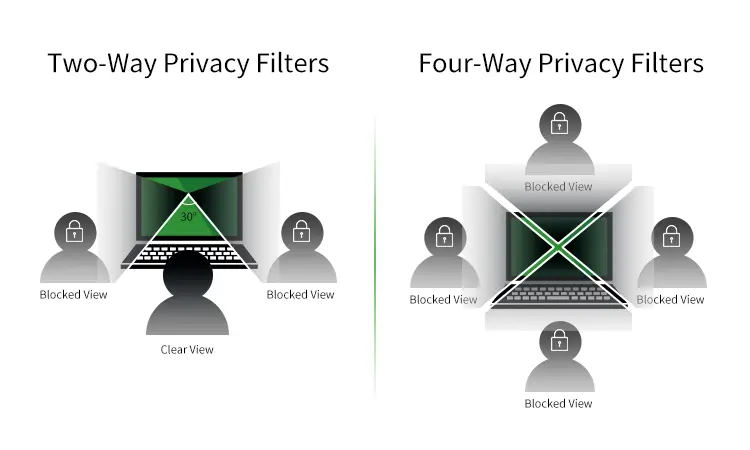
1.1 Two-Way Privacy Filters
- Viewing Angle Protection:Blocks side views from the left and right (typically at 30°-45°).
- Best For:Office professionals, students, and remote workers using laptops or desktop monitors.
- Pros:Effective for reducing horizontal viewing and widely available.
- Cons:Does not block views from above or below.
1.2 Four-Way Privacy Filters
- Viewing Angle Protection:Blocks views from all four directions—left, right, top, and bottom.
- Best For:High-security environments such as finance, banking, and healthcare industries.
- Pros:Offers comprehensive privacy protection.
- Cons:Slightly darker screen appearance compared to two-way filters.
2. Classification by Installation Method
Privacy filters can be installed in different ways, depending on whether the user prefers a permanent or removable solution.
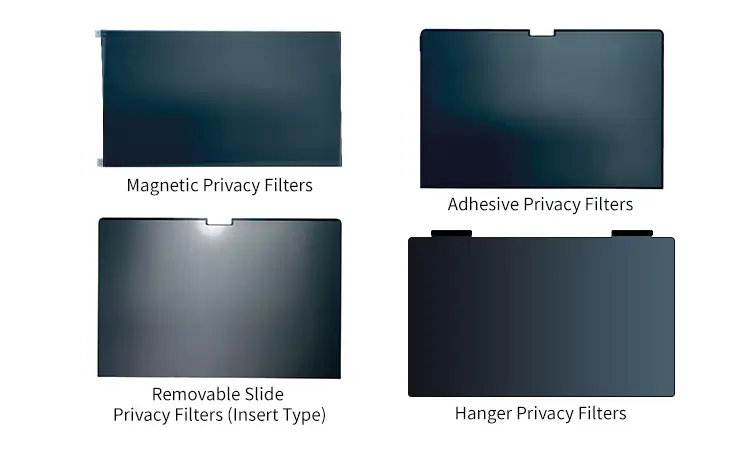
2.1 Magnetic Privacy Filters
- Installation Method:Attaches to the screen magnetically, making it easy to remove and reapply.
- Best For:MacBook users, frequent travelers, and professionals who switch between privacy and full-screen visibility.
- Pros:Quick installation and removal without adhesives.
- Cons:Compatible mainly with MacBooks and certain laptops with magnetic edges.
2.2 Adhesive Privacy Filters
- Installation Method:Uses semi-permanent adhesive strips to attach directly to the screen.
- Best For:Dedicated workstations and devices used by a single person.
- Pros:Secure attachment that prevents accidental removal.
- Cons:Harder to remove and may leave adhesive residue on the screen.
2.3 Removable Slide Privacy Filters (Insert Type)
- Installation Method:Slides into a mounting frame attached to the screen.
- Best For:Users who frequently switch between privacy and open-view modes.
- Pros:Easy to remove and reattach as needed.
- Cons:Requires additional mounting brackets, which may affect aesthetics.
2.4 Hanger Privacy Filters
- Installation Method:Hangs over the top of the screen without adhesives or mounting brackets.
- Best For:Large desktop monitors and shared workstations.
- Pros:Easy to install and remove without damaging the screen.
- Cons:Slightly less secure than adhesive or slide-on options.
3. Classification by Additional Features
Some privacy filters offer enhanced functionalities beyond visual privacy, catering to users with specific needs.
3.1 Blue Light Filtering Privacy Screens
- Functionality:Reduces blue light emission while providing screen privacy.
- Best For:Users working long hours on screens, such as designers, gamers, and corporate employees.
- Pros:Minimizes eye strain and improves sleep quality.
- Cons:May slightly alter color accuracy.
3.2 Touchscreen-Compatible Privacy Filters
- Functionality:Designed for touch-enabled devices, ensuring privacy without affecting touchscreen responsiveness.
- Best For:Tablets, smartphones, and 2-in-1 laptops.
- Pros:Maintains touch sensitivity while blocking side views.
- Cons:May slightly impact screen clarity.
3.3 Anti-Glare Privacy Filters
- Functionality:Reduces screen glare and reflections while maintaining privacy.
- Best For:Outdoor use and bright environments.
- Pros:Improves screen visibility in bright conditions.
- Cons:Can slightly reduce display sharpness.
3.4 Ultra-Thin Privacy Filters
- Functionality:Designed to be thinner and lighter than standard filters, maintaining a sleek look.
- Best For:Users who prioritize aesthetics and portability.
- Pros:Less noticeable and does not add bulk to the device.
- Cons:May not provide the same level of privacy as thicker filters.
4. Classification by Material
Privacy filters are made from different materials that affect durability, clarity, and usability.
4.1 PET (Polyethylene Terephthalate) Privacy Filters
- Material:Lightweight and flexible plastic.
- Best For:Laptops, monitors, and smartphones.
- Pros:Affordable, easy to install, and widely available.
- Cons:Less durable than glass options.
4.2 Tempered Glass Privacy Filters
- Material:Strong, scratch-resistant glass.
- Best For:High-end laptops, tablets, and smartphones.
- Pros:Superior durability, scratch resistance, and smooth touch feel.
- Cons:More expensive and slightly heavier.
4.3 Acrylic Privacy Filters
- Material:Rigid plastic, thicker than PET.
- Best For:Desktop monitors and POS systems.
- Pros:Durable and long-lasting.
- Cons:Bulkier than PET filters.
5. Classification by Compatible Devices
Privacy filters are designed to fit different device types, ensuring maximum usability.
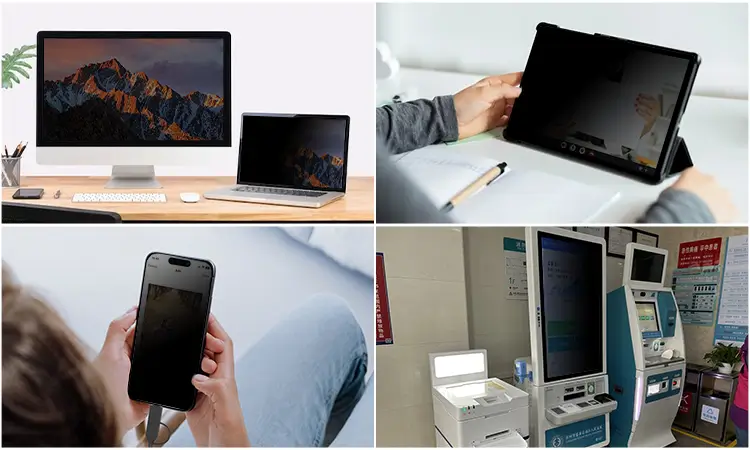
5.1 Laptop Privacy Filters
- Compatibility:Designed for various laptop screen sizes (13″, 15″, 17″, etc.).
5.2 Desktop Monitor Privacy Filters
- Compatibility:Larger screens (19″, 22″, 24″, etc.).
5.3 Tablet Privacy Filters
- Compatibility:iPads, Android tablets, and other touchscreen devices.
5.4 Smartphone Privacy Filters
- Compatibility:iPhone and Android smartphones.
5.5 ATM & POS System Privacy Filters
- Compatibility:ATMs, point-of-sale terminals, and self-service kiosks.
6. How to Choose the Right Privacy Filter?
Choosing the right privacy filter involves considering multiple factors, including device compatibility, viewing angle needs, installation preference, and material.
Here’s a comprehensive guide to help you select the best option:
|
Device Type |
Viewing Angle |
Installation Preference |
Recommended Material |
|
Laptop |
Two-Way |
Magnetic / Adhesive / Removable Slide |
PET / Tempered Glass |
|
Desktop Monitor |
Two-Way/ Four-Way |
Hanger / Adhesive / Removable Slide |
Acrylic / PET |
|
Tablet |
Two-Way |
Adhesive / Removable Slide |
PET / Tempered Glass |
|
Smartphone |
Two-Way |
Adhesive |
Tempered Glass |
|
ATM/ POS Systems |
Four-Way |
Adhesive / Hanger |
Acrylic / PET |
Looking for bulk privacy filters for laptops and monitors?
REEDEE offers high-quality PET privacy screen protectors with OEM customization.
Contact us now for pricing and samples!