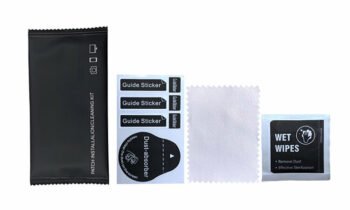
How to Clean a TPU Screen Protector: A Complete Guide
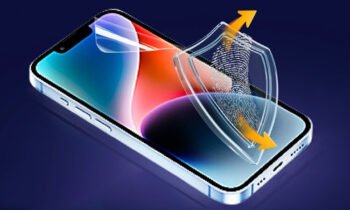
How to clean a tpu screen protector?
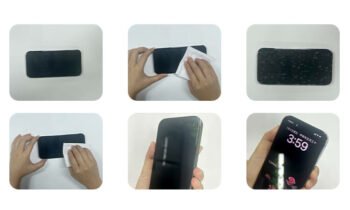
- Turn Off Your Device: Before you start cleaning, turn off your device to avoid any accidental touches or potential damage from moisture.
- Initial Dust and Fingerprint Removal: Use a dry microfiber cloth to gently wipe away any dust and fingerprints. Microfiber cloths are ideal because they are soft and non-abrasive, reducing the risk of scratching the screen protector.
- Dampen the Cloth: For more stubborn smudges or oily residues, lightly dampen the microfiber cloth with water or a mixture of water and a few drops of mild dish soap. Ensure the cloth is not too wet to prevent excess moisture from seeping into the phone’s openings.
- Wipe the Screen: Gently wipe the screen protector with the dampened cloth in a circular motion. Avoid pressing too hard as this can cause scratches or other damage.
- Dry the Screen: After cleaning, use a dry microfiber cloth to remove any remaining moisture. This step is crucial to prevent water spots and streaks.
- Inspect the Screen: Check the screen protector for any remaining smudges or dust. If necessary, repeat the cleaning process until the protector is completely clean.
- Avoid Harsh Chemicals: Do not use abrasive materials or harsh chemicals like alcohol, ammonia, or glass cleaners. These substances can degrade the TPU material, causing it to become brittle and less effective over time.
By following these steps, you can maintain the clarity and effectiveness of your TPU screen protector, ensuring it continues to protect your device’s display.
Here are some FAQs about related issues
1. Can you use alcohol wipes on a screen protector?
Using alcohol wipes on a TPU screen protector is not recommended. Alcohol can degrade the material over time, causing it to become brittle and less effective. Instead, use a microfiber cloth dampened with water or a mild soap solution. Alcohol-based cleaners can also leave streaks, making your screen look less clear.
2. How do I know if my screen protector is glass or plastic?
To determine if your screen protector is glass or plastic, gently tap on it with your fingernail. Glass screen protectors feel hard and produce a sharper sound, while plastic ones, including TPU, feel softer and produce a duller sound. Additionally, glass protectors are generally thicker and have a more rigid structure, while TPU protectors are more flexible and thinner.
3. How to apply a TPU protector?
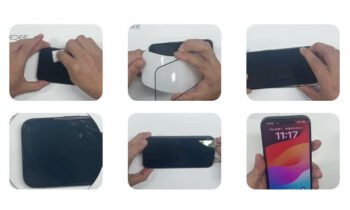
Peel Off the Backing: Carefully peel off the backing from the TPU protector, exposing the adhesive side.
Align the Protector: Align the protector with your screen, starting at one end. Make sure it is perfectly aligned with the edges and any cutouts for the camera or sensors.
Apply the Protector: Slowly apply the protector, smoothing out any bubbles with a credit card or a similar tool. Start from the center and work your way outwards to push out any air bubbles.
Final Inspection: Check for any remaining bubbles or misalignments. If necessary, lift the protector gently and reapply.
4. How do you remove scratches from TPU?
While minor scratches on a TPU screen protector can sometimes be minimized using a bit of baby oil, deeper scratches are generally difficult to remove. In such cases, replacing the screen protector is the best option. To minimize scratches in the future, avoid placing your device in pockets or bags with keys or other sharp objects.
5. Should I remove my screen protector if it has bubbles?
If your screen protector has bubbles, you can try to remove them by gently pressing them out with a credit card. If the bubbles persist, it might be best to remove and reapply the screen protector. Persistent bubbles can affect touch sensitivity and the overall appearance of your screen.
6. Is hydrogel the same as a TPU screen protector?
Hydrogel and TPU screen protectors are similar but not identical. Hydrogel protectors are known for their self-healing properties and are generally thinner, while TPU protectors offer robust protection but may not self-heal as effectively. Hydrogel protectors are also more flexible and can better conform to curved screens, whereas TPU protectors are slightly more rigid.
7. How Plastic Screen Protectors Affect Display Quality?
Plastic screen protectors, including TPU, can slightly affect the display quality by adding a thin layer over the screen. However, high-quality TPU protectors are designed to be clear and should not significantly impact the display’s brightness or touch sensitivity. Lower quality protectors, on the other hand, can cause a noticeable decrease in display clarity and responsiveness.
8. Hydrogel Screen Protector HD Self-Healing BU11 2 Reedee
The Hydrogel Screen Protector HD Self-Healing BU11 2 Reedee is an example of a high-quality screen protector that offers both clarity and self-healing properties, making it a popular choice for many users. This type of protector can heal minor scratches over time, maintaining a clear and smooth surface without the need for frequent replacements.
9. Which Type of Screen Protector is Best?
The best type of screen protector depends on your needs. If you want robust protection, a tempered glass protector might be best. For flexibility and self-healing properties, a hydrogel or TPU protector is a good choice. Tempered glass protectors offer strong resistance to impacts and scratches but can shatter upon a strong impact. TPU protectors provide a balance between flexibility and durability, while hydrogel protectors offer the added benefit of self-healing minor scratches.
Detailed Analysis

Hydrogel protectors, on the other hand, are gaining popularity for their self-healing properties. These protectors can repair minor scratches over time, maintaining a clear and smooth surface. This feature is particularly useful for users who are concerned about the aesthetic appearance of their screen and want a long-lasting solution.
Tempered glass protectors are often considered the gold standard for screen protection. They offer superior resistance to scratches and impacts, providing robust protection for your device. However, they are more rigid and can shatter upon a strong impact, which might not be ideal for all users.
In conclusion, the choice between TPU, hydrogel, and tempered glass protectors depends on your specific needs. If you prioritize flexibility and ease of application, TPU protectors are an excellent choice. For self-healing properties and a smooth finish, hydrogel protectors are ideal. If maximum protection is your primary concern, tempered glass protectors are the way to go.
Conclusion